Rackbeat offers two methods for transferring inventory value and product costs to e-conomic:
- Immediate synchronization (Live Sync)
- Daily, weekly, or monthly synchronization
This article describes Live Sync (Immediate Synchronization).
If you are using daily, weekly, or monthly synchronization we refer to the following article:
Setting up Livesync
Go to the e-conomic integration:
Find the Company settings in the top right corner --> Integrations --> e-conomic settings
Please note! These settings are only available in danish.
-
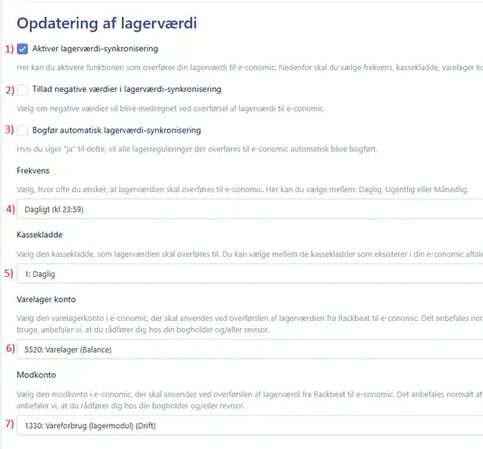
Activate 'Daglig lagerværdiopdatering':
- Under the 'Daglig lagerværdi opdatering' section, you can enable automatic synchronization of the inventory value.
- Negative værdier:
- Here, you can choose whether negative inventory values should be included when transferring inventory value to e-conomic.
A negative inventory value occurs when a product with a registered cost price has a negative stock quantity. In this situation, the product contributes a negative value to the overall inventory valuation.
- Here, you can choose whether negative inventory values should be included when transferring inventory value to e-conomic.
- Automatisk bogføring:
- If you enable this option, all inventory adjustments transferred to e-conomic will be posted automatically instead of being transferred to a journal draft (Recommended).
- Choose Overførselsfrekvens:
- Choose how often the inventory value should be transferred:
- Daily at 11:59 PM (Recommended)
- Weekly (Sunday at 11:59 PM)
- Monthly (the last day of the month at 11:59 PM)
-
Important: If automatic posting is not enabled, it is recommended that you post the entries immediately, or at least before the next automatic adjustment is transferred, to avoid timing discrepancies and duplicate postings.
- Choose how often the inventory value should be transferred:
- Choose kassekladde:
- You must select the journal into which these entries will be transferred.
- Tip: We recommend creating a dedicated journal specifically for Rackbeat's inventory value entries.
- Choose varelagerkonto:
- Select the inventory account in e-conomic that should be used when transferring inventory value from Rackbeat to e-conomic.
This account is typically located in the balance sheet.
- Select the inventory account in e-conomic that should be used when transferring inventory value from Rackbeat to e-conomic.
- Choose vareforbrugskonto:
- Select the offset account in e-conomic that should be used when transferring the cost of sales from Rackbeat to e-conomic.
This is typically your operating expense account.
- Select the offset account in e-conomic that should be used when transferring the cost of sales from Rackbeat to e-conomic.
If you are unsure which account in your chart of accounts should be used here, we recommend consulting your bookkeeper and/or accountant.
How Livesync works
The automatic inventory value adjustment keeps track of the difference between the posted value on the inventory account in e-conomic and the current inventory value in Rackbeat.
This ensures that your accounting always reflects the true value of your stock.
Example
Inventory value in Rackbeat as of 01.01.2025: 100,000 DKK
Balance on the inventory account in e-conomic: 100,000 DKK
Transactions totaling –20,000 DKK are now carried out on the same day.
New inventory value in Rackbeat: 80,000 DKK
Inventory account in e-conomic: 100,000 DKK
At 23:59 on 01.01.2025, an adjustment of –20,000 DKK is transferred to the inventory account, with a corresponding offset entry to cost of sales.
After this, the figures look as follow:
Inventory account balance: 80,000 DKK.
Adjustment posted to cost of sales: 20,000 DKK.
Kindly note
The inventory value transferred to e-conomic includes future transactions, such as incoming receipts and outgoing shipments.
Therefore, discrepancies may occur between the inventory value shown in reports (which by default is calculated as of today without future entries) and the actual value recorded in the accounting system.
Livesync in your income statement
To understand how inventory value is used to calculate gross profit, we will go through how Rackbeat transfers this into your income statement.
The cost price of your products is naturally part of the inventory value, and therefore included in the cost of goods sold transferred by Rackbeat.
This means that the value originally recorded as an expense through supplier invoices is reversed against cost of sales when the goods are sold.
Example:
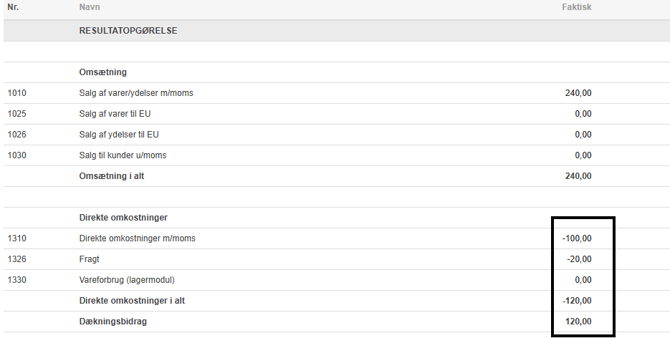
A supplier invoice is booked in Rackbeat with a purchase of 120 DKK
That will increase the inventory value by 120 DKK:

100 DKK is booked as direct costs from the invoice, and 20 DKK as freight in the income statement.
Inventory is debited, and the offset account (cost of goods sold) is credited with 120 DKK.
Gross profit is 0:

The item is later sold for 240 DKK , and removed from inventory at a cost of 120 DKK.
The customer invoice is recorded as revenue of 240 DKK.
Inventory is credited, and cost of goods sold is debited again by 120 DKK.
This results in the correct gross profit of 120 DKK (50%).
Logic behind the transfer
To understand the logic behind the automatic inventory value adjustment, we will start by reviewing our 'creditor integration' (supplier invoices) in Rackbeat.
In Rackbeat, we recommend posting purchases directly to operating expenses (i.e. not to an inventory balance sheet account).
The reason for this relates to VAT codes and subsequent reporting. When a supplier invoice is transferred to a journal in e-conomic, Rackbeat always applies the selected default VAT code on the financial account.
This means that if you use an inventory account as the offset account for supplier invoices, the entry in e-conomic would always be posted without a VAT code (and therefore without VAT deduction).
For this reason, we recommend posting purchases directly to operating expenses. This also allows you to use the correct VAT codes depending on the supplier’s location, for example I25 or IV25.
The setup for this can be found in the e-conomic integration, under the Leverandørfaktura tab.

We also recommend creating a separate account for purchases of goods in Denmark without VAT, for example account 1315: "Direkte omkostninger DK u/moms". Click here to learn how to do so.
Example
You receive an invoice for the purchase of goods from your Danish supplier, for example Vareleverandør ApS. The invoice amount is DKK 30,000 including VAT.
The invoice is registered in Rackbeat and transferred to the journal 'Daglig' in e-conomic as Leverandørfaktura, it is posted to account 1310 with VAT code I25.
How a supplier invoice is booked:
| Debet | Kredit |
|
1310: 24.000 (purchase of goods) 6903: 6.000 (VAT) |
6800: 30.000 (Supplier) |
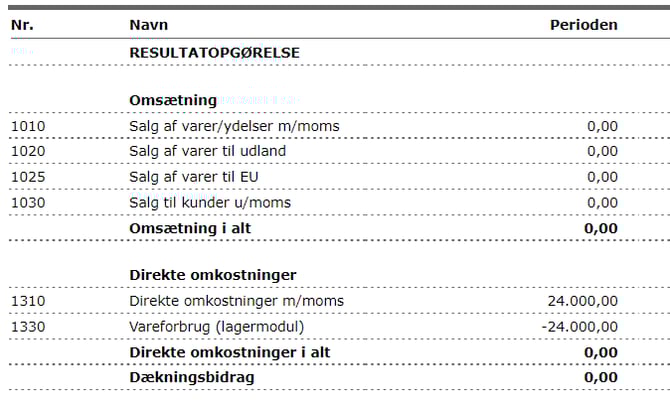
Your inventory value in Rackbeat has now increased by DKK 24,000, as only inventory purchases have been made and no goods have been sold during the period. At 11:59 PM, Rackbeat will perform an automatic inventory adjustment, which will appear as follows:
| Debet | Kredit |
| 5520: 24.000 (Inventory) | |
| 1330: 24.000 (Adjustment) |
Your financial statements will then appear as follows: