Table of Contents
Overview
Sales budgets are created at the product level by specifying a desired period and a budget amount.
Once the budget is created, you can generate reports showing the extent to which each product's revenue during that period meets the established budget.
Revenue is calculated based on the sum of posted invoices within the period, excluding VAT.
Creating Sales Budgets
Create a Sales Budget Manually:
- Go to Inventory -> Products.
- Open the product you wish to create a budget for.
- Click on the "Sales Budgets" tab.
a. Here, you can view, create, and edit the product's sales budgets.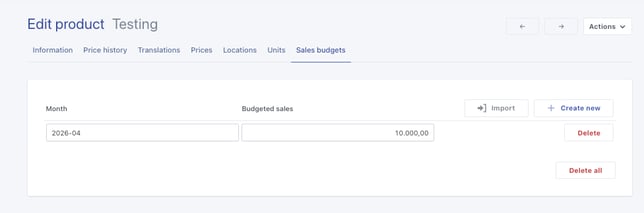
- Click "Create New".
In the next window, you can choose whether to create a budget for one month at a time or set up a longer period (e.g., quarter or year):
- Uncheck "Create budget per interval (month)" to set up a budget for a single month.
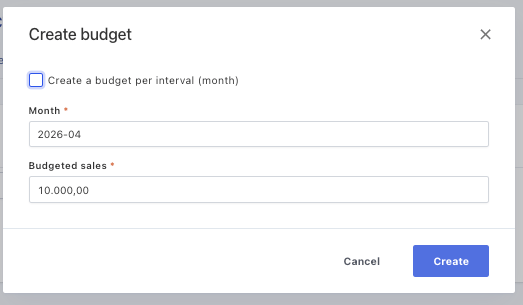
- Enabled: The amount under Budgeted Sales will be distributed across the selected months.
- Example: 3-month period / Budget of 10,000 = 3,333.33 per month.
- Disabled: Each month will be assigned a budget of the full selected amount.Check "Create budget per interval (month)" to enable the From month - To month option.
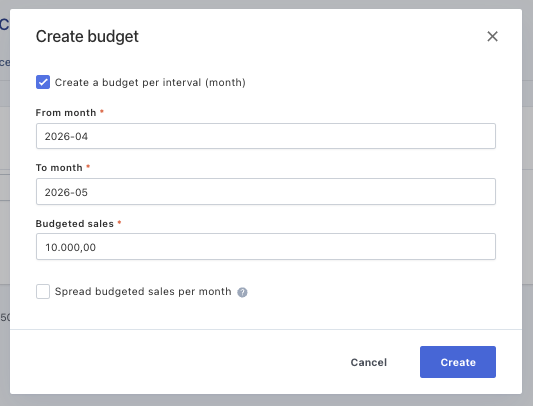
If you have chosen to create a budget for a period, you can check "Spread budgeted sales per month":
- Enabled: The amount under Budgeted Sales will be distributed across the selected months.
- Finish by clicking "Create".
Create Sales Budgets via Import:
You can import sales budgets for your products by using a file with the following three headings:
- Product – Specify the item number.
- Month – Enter the month in the format Year-Month (YYYY-MM).
- Expected Sales – Enter the amount you expect to sell, excluding VAT.
Example:
| Product | Month | Expected sales |
| 1375-1 | 2026-01 | 10000 |
| 1375-2 | 2026-02 | 12000 |
The Sales Budgets Report
Once you have created your sales budgets, you can generate a report on the results.
How to run the report:
- Go to Reporting -> Sales Budgets.
- Set your period in Date From / Date To.
- Group by period:
- Enable if you want the report divided into intervals (months)

- Disable to see the period shown as a total sum.

- Enable if you want the report divided into intervals (months)